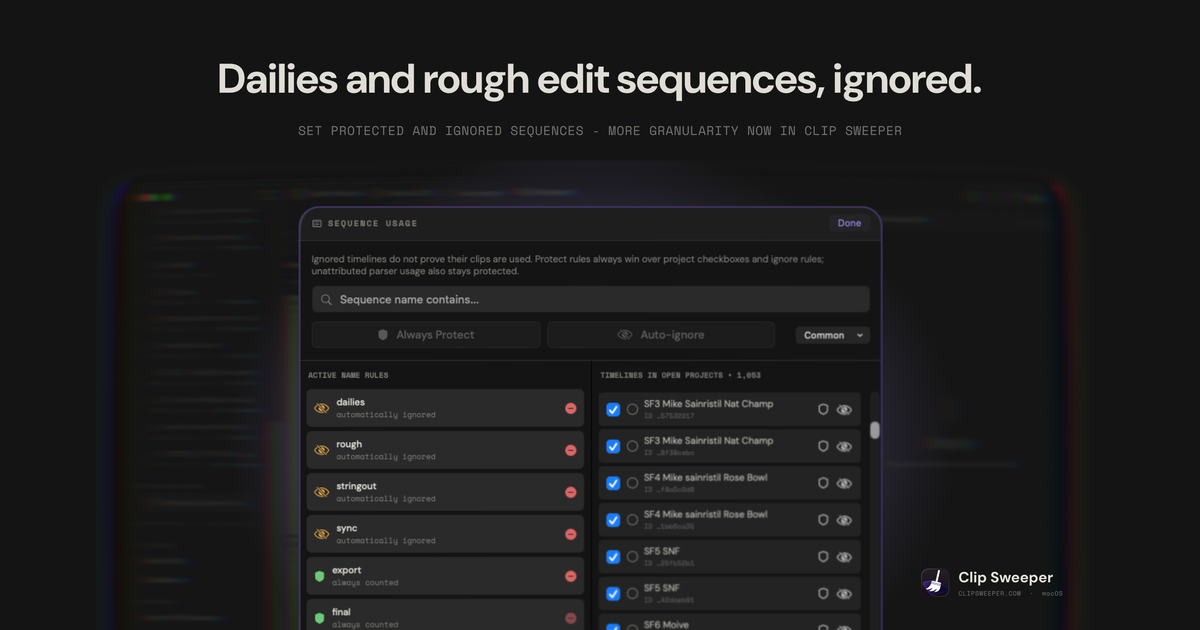
Clip Sweeper answers one question: is this file used by anything? Until now it accepted any timeline as proof. Version 2.3 lets you say which timelines you believe.
The Problem With Counting Every Timeline
A sequence is not evidence that footage matters. Most projects are full of timelines that exist for a day and then stop meaning anything:
- Dailies. Everything the camera shot, dropped on a timeline so somebody could watch it.
- Stringouts. Every usable take, in order, before any decisions were made.
- Rough cuts. The version from three weeks ago that no longer resembles the edit.
- Sync maps. Audio lined up against picture, built once and never opened again.
Every clip that ever touched one of these reads as "in use". A dailies timeline alone can make an entire card look load-bearing. So the footage you most want to clear is exactly the footage that looks busiest, and Clip Sweeper had no way to tell the difference.
Your export and final timelines are the ones that mean something. Version 2.3 lets you say so.
Name Rules
Open Sequence Usage and write rules against sequence names. A rule is a substring match, so dailies catches Dailies 08-14, SF3 dailies v2, and DAILIES_reel_1.
Two kinds:
- Auto-ignore — a timeline matching this name no longer proves anything. Clips that appear
only here become eligible.
- Always protect — a timeline matching this name always counts, whatever else says otherwise.
Sensible starting rules are dailies, rough, stringout and sync on the ignore side, and export and final on the protect side. Rules persist across launches and apply to every project you open.
Per-Project Overrides
Name rules are broad by design, and broad rules are wrong sometimes. Any individual timeline can be overridden with a checkbox, and an explicit choice beats an auto-ignore rule.
The overrides are per project, not per name. Two projects can each hold a sequence called Rough Cut, and marking one as counting leaves the other alone. This matters more than it sounds: sequence names repeat constantly across a season of work, and a setting that leaked between projects would be worse than no setting at all.
Ambiguity Always Resolves Toward Keeping the File
Every rule in this feature can only make Clip Sweeper more cautious than you asked, never less.
Protect always wins. If a timeline matches both an ignore rule and a protect rule, it counts. Protection also beats a per-project checkbox that says to ignore it. There is no combination of settings that turns a protected timeline into a discardable one.
Unattributed usage can never be ignored. When the parser sees a clip is used but cannot tie that use to a specific sequence, the usage stays counted no matter what your rules say. Ignore rules only apply to references Clip Sweeper can positively attribute. A file cannot be swept because Clip Sweeper failed to understand where it was used — which is the failure mode that would cost you a shot.
Ignoring is not deleting. An ignored timeline changes one thing: whether its clips are evidence. Nothing is removed, and the same three safety gates still stand between a result and your drive.
Also in 2.3
Duplicate detection now reads the file, not the file name. Until 2.3, two files counted as duplicates when their names matched. That is wrong in both directions. A001_C003.mov copied from two different cards is two different shots with one name, and the same clip renamed on the way to a client is one shot the old check could never pair up. Version 2.3 compares content instead, using a bounded hash that reads a partial signature first and only computes the full one when it has to. Duplicates still appear as their own filter and a count in the summary; the answer behind them is now trustworthy.
Direct download with automatic updates. There are now two builds. The Mac App Store version works as it always has. The direct version is Developer ID signed, notarized, stapled, and updates itself through a signed appcast, so you no longer wait on review to get a fix. Both are universal and both need macOS 14 or later.
A licence key path for the direct build. Buy once, unlock the app, recover the key later if you lose it.
Where to Start
Open Sequence Usage and add dailies and stringout as ignore rules before your next scan. On most drives those two lines are the difference between a result you act on and a result where everything looks used.
Before you buy more storage, check how much you can reclaim.
If you disagree with what a rule did, protect that timeline. Protection always wins, which is the whole point.